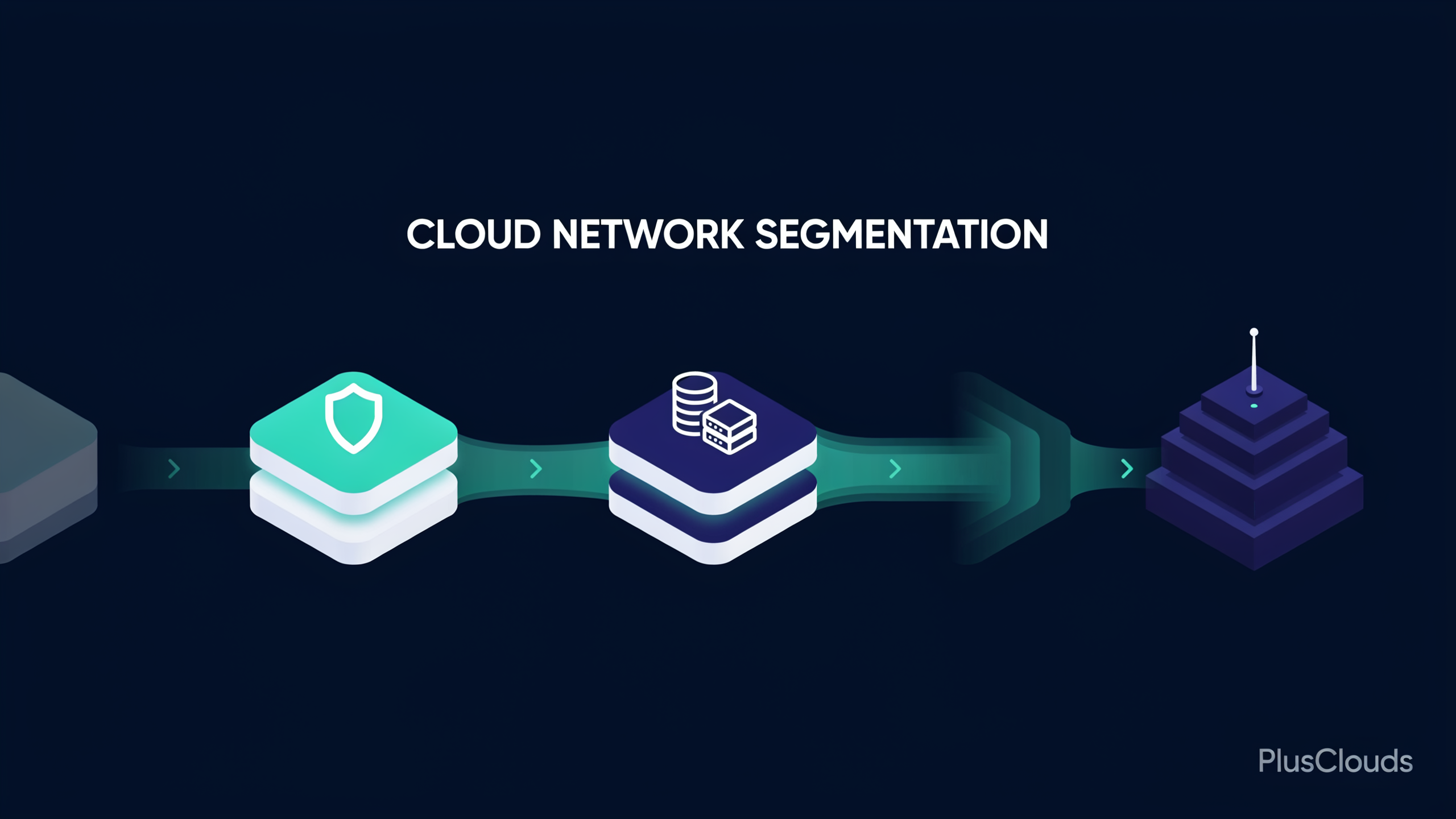
Your production database talks to the internet. Not on purpose, of course. But somewhere along the way, a flat network made it possible, and nobody noticed until a penetration test report landed on someone's desk with the words "critical severity" in bold.
This is the most common failure we see when teams migrate to the cloud: they lift and shift their workloads, keep everything on one subnet, and inherit a network topology designed for an office LAN in 2009. Cloud providers give you the tools to build proper cloud network segmentation, but tools are not topology. You have to design the zones yourself.
The good news is that a well-segmented network is not complicated. It follows a small set of patterns that security teams have refined over two decades, and once you understand the five core zones (public, private, VPN, management, and DMZ), the whole design clicks into place. This guide walks through each zone, what belongs in it, and how to wire them together without creating the accidental highways that make auditors nervous.
Key takeaways
- Cloud network segmentation divides infrastructure into five core zones: public, private, VPN, management, and DMZ, with controlled traffic paths between them.
- Segmentation limits blast radius, blocks lateral movement, simplifies PCI DSS, HIPAA, ISO 27001, and SOC 2 audits, and isolates backup and monitoring traffic from production load.
- Databases belong in the deepest private tier with no public IP and no outbound internet route, ever.
- Load balancers act as policy enforcement points between zones, not just scaling tools.
- Egress rules matter as much as ingress rules: a compromised server with unrestricted outbound access is an exfiltration channel.
Table of Contents
- Why Network Segmentation Is No Longer Optional in Cloud Infrastructure
- The Five Network Security Zones Explained: Public, Private, VPN, Management, and DMZ
- What Goes in Each Zone: A Practical Workload Mapping Guide
- How Public and DMZ Networks Work Together to Protect Internet-Facing Services
- Using Private Networks to Shield Databases and Internal Services
- VPN Networks: Securing Remote Access Without Exposing Your Internal Plane
- Management Networks: Keeping Control Traffic Separate from Production Traffic
- Load Balancers as the Policy Enforcement Layer Across Zones
- Common Segmentation Mistakes and How to Avoid Them
- How to Deploy a Multi-Zone Cloud Network from a Single Control Plane
- Wrapping Up
Why Network Segmentation Is No Longer Optional in Cloud Infrastructure
A flat network operates on a simple assumption: everything inside the perimeter is trustworthy. That assumption died a long time ago, and regulations killed it formally. PCI DSS requires network segmentation for any environment handling cardholder data. HIPAA's Security Rule expects technical isolation around electronic protected health information. DORA expects financial firms to prove their recovery architecture is isolated from attack paths.
But even if you answer to no regulator, segmentation is still the single cheapest security control you can deploy. Here's why:
- Blast radius control. When a container in your web tier gets compromised, segmentation determines whether the attacker can reach your database in one hop or hits a wall of deny rules.
- Lateral movement prevention. Most real-world breaches are not single exploits. They are chains: get a foothold, pivot, escalate. Segmentation breaks the chain.
- Cleaner audit evidence. "The payment database has no route to the internet" is a sentence you can prove with a routing table. "We have firewalls" is not.
- Performance isolation. Backup traffic, monitoring scrapes, and replication streams should never compete with customer-facing requests for bandwidth.
If you're working through compliance requirements specifically, our guide to PCI DSS 4.0.1 firewall, WAF, and segmentation controls covers how auditors evaluate these zones in practice.
The Five Network Security Zones Explained: Public, Private, VPN, Management, and DMZ
Think of these zones as rooms in a building with different door policies.
Public network. Traffic enters and exits here. It's the internet-facing plane where your load balancers, ingress points, and anything that must accept unsolicited connections live. Nothing sensitive should terminate here directly.
Private network. The workhorse zone. Application servers, databases, caches, message queues, and internal APIs live here with no direct internet route. Outbound access (for updates, package pulls, API calls) is typically mediated through NAT or a proxy.
VPN network. A controlled tunnel for humans and systems that need to reach private resources from the outside: remote engineers, CI/CD runners, third-party vendors. Instead of exposing SSH or RDP ports, you terminate the tunnel and grant access from there.
Management network. A dedicated plane for control traffic: SSH, hypervisor APIs, monitoring agents, configuration management, backup orchestration. It is separate from production traffic so that a saturated application tier never locks you out of your own infrastructure, and so that admin credentials never ride the same wires as customer data.
DMZ. A buffer zone between the public internet and your private network. Anything that must accept inbound connections but shouldn't sit fully exposed goes here: reverse proxies, mail relays, FTP endpoints, VPN concentrators. The DMZ's whole job is to absorb and contain attacks aimed at internet-facing services.
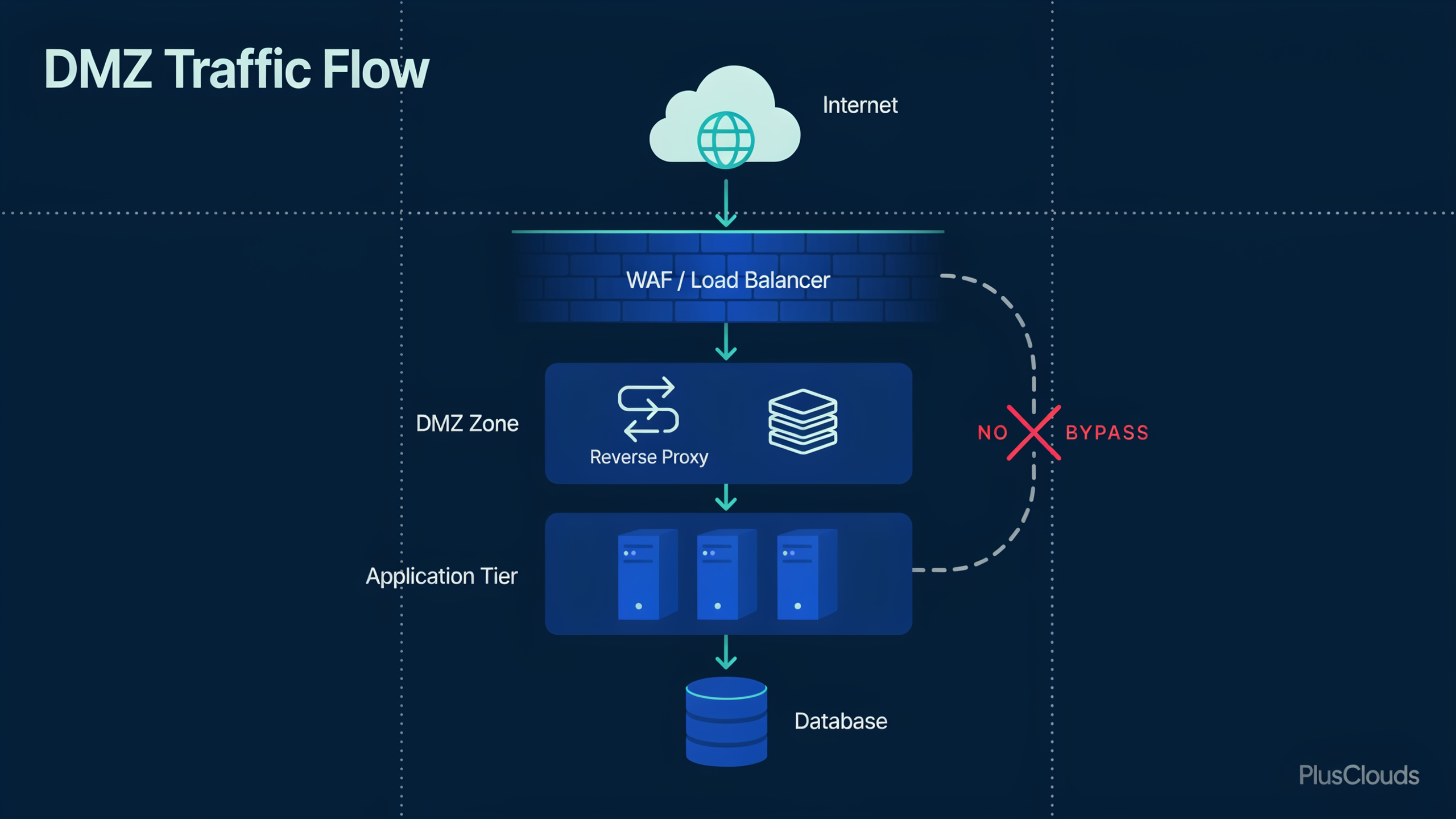
The classic design rule: traffic should flow through zones in a controlled sequence, never around them. Internet → DMZ → private tier → database tier. Each hop passes a policy checkpoint.
What Goes in Each Zone: A Practical Workload Mapping Guide
Here's the mapping most cloud architectures converge on:
| Workload | Zone | Why |
|---|---|---|
| Load balancer / WAF | Public or DMZ | Terminates inbound traffic, filters it before it reaches apps |
| Reverse proxy (nginx, Envoy) | DMZ | Shields app servers from direct exposure |
| Web/application servers | Private | Never accept inbound from the internet directly |
| Databases, caches, queues | Private (deepest tier) | Reachable only from the app tier |
| Bastion host / jump box | DMZ or VPN zone | Single audited entry point for admin access |
| CI/CD runners, deploy tooling | Management | Control plane work belongs off the production path |
| Monitoring, logging, backup agents | Management | Telemetry and recovery traffic isolated from prod |
| SFTP drop zones, legacy protocols | DMZ | Old protocols that can't be hardened belong in the blast zone |
A few judgment calls worth making deliberately:
Databases go in the deepest private tier, always. If your database has a public IP "temporarily for debugging," that temporary state has an average lifespan measured in years. Give the database tier a security group that only accepts traffic from the application tier's subnet on the specific port it needs.
Legacy systems get quarantined, not integrated. That Windows Server 2012 box running an internal ERP? It goes in its own restricted zone with tightly enumerated allow rules, not on the general private network where it becomes the softest target.
Anything that must speak to the internet but can't be trusted goes in the DMZ. This is the whole point of the zone, and it's the part most often skipped.
How Public and DMZ Networks Work Together to Protect Internet-Facing Services
The DMZ pattern dates back to on-premises firewall design, and its cloud translation is well documented. AWS describes the modern version as a DMZ architecture with VPC-level public access blocking, where the account or VPC itself is configured so private resources cannot receive public traffic even by misconfiguration. Alibaba Cloud's well-architected guidance makes the same point from the entrance side, emphasizing a unified public network entrance and exit design so that inbound and outbound flows are controlled at a single chokepoint rather than scattered across instances.
The Infosec Institute's overview of virtual DMZs in the cloud frames the core principle well: the DMZ exists so that a compromise of an internet-facing service does not grant the attacker a position from which they can reach internal systems.
In practice, a solid cloud DMZ setup looks like this:
- Inbound traffic hits a load balancer or WAF on the public/DMZ boundary.
- The WAF inspects requests for injection attempts, known exploit signatures, and bot patterns. Layer 7 filtering matters because modern attacks don't stop at the network layer; our breakdown of multi-vector DDoS defense across layers 3, 4, and 7 covers what happens when attackers hit all of them at once.
- Only the load balancer's private interface can reach the application tier, and only on the application port.
- Application servers have no public IPs, no internet gateways on their route table, and no security group rules allowing inbound from the DMZ except through the load balancer.
The result: an attacker who exploits a vulnerability in your web app is standing in the DMZ holding a shell that points at nothing. Every route forward is denied by default.
Using Private Networks to Shield Databases and Internal Services
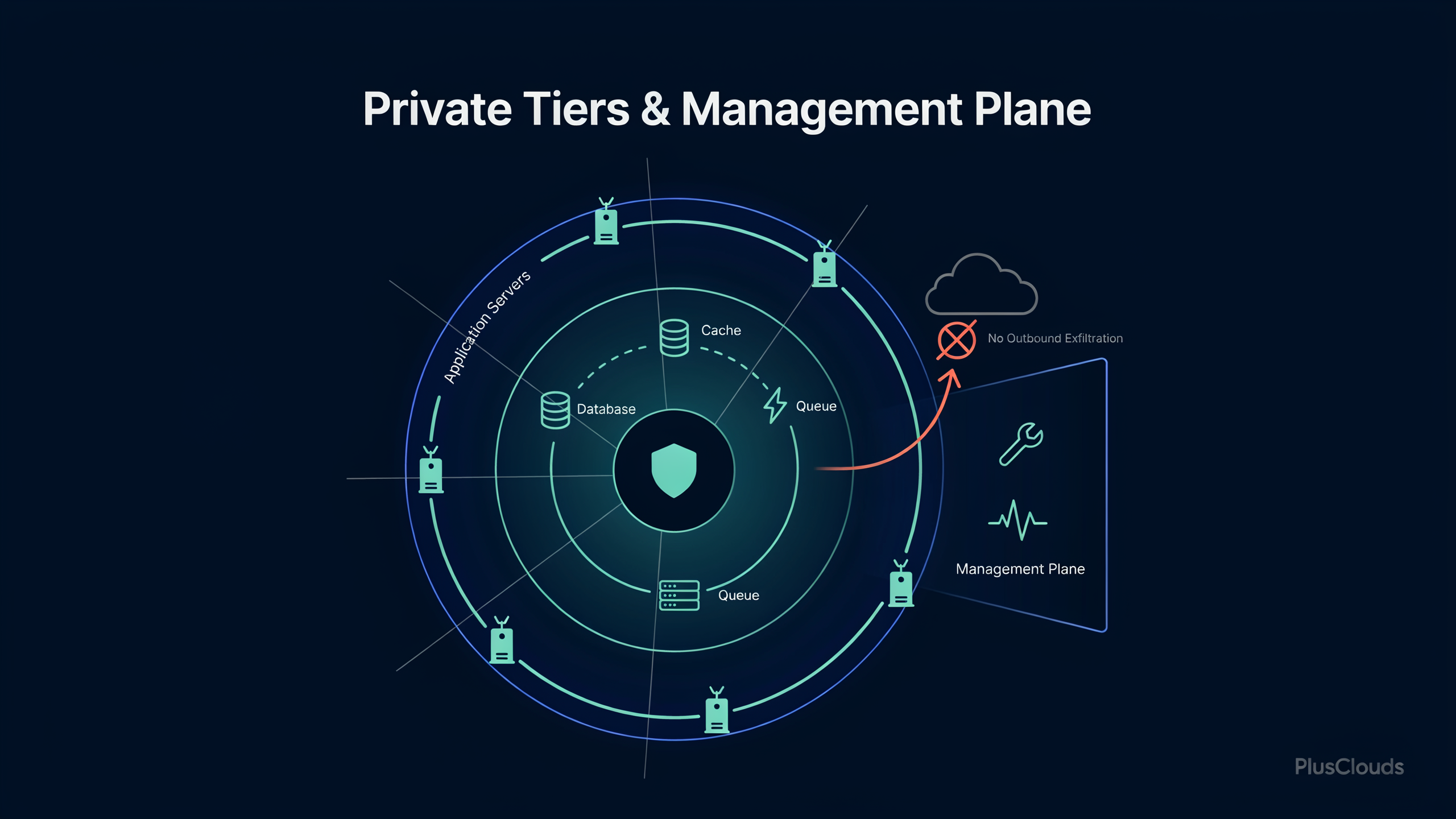
The private zone is where segmentation pays its rent. The design question is usually how many private tiers you need. For most SMB and mid-market architectures, two is the answer:
- Application tier: web servers, API services, workers. Allowed to initiate outbound connections (through NAT) for updates and third-party APIs. Inbound only from the DMZ/proxy tier.
- Data tier: databases, Redis, Kafka, object storage endpoints. Inbound only from the application tier. No outbound internet access at all.
That last rule is worth repeating: your database should not be able to reach the internet. If it's compromised, the attacker should have no exfiltration path. Data tier instances get no NAT route, no public IP, nothing.
Internal services deserve the same treatment. A payment processing microservice, an internal admin panel, a reporting endpoint: these should each be reachable only from the specific subnets that need them, enforced with security groups or network ACLs rather than good intentions.
One pattern worth adopting: name your subnets after their function (app-tier-eu, data-tier-eu, mgmt-eu) and write your firewall rules against subnet boundaries, not instance IPs. IP-based rules rot the moment an instance is replaced. Subnet-based rules survive.
VPN Networks: Securing Remote Access Without Exposing Your Internal Plane
Every open SSH port on a public IP is a standing invitation. Bots scan the entire IPv4 space continuously; if you've ever read an auth log on an internet-facing server, you've seen the evidence.
The VPN zone replaces port exposure with tunnel establishment. The model:
- A VPN concentrator (WireGuard, OpenVPN, IPsec, or a commercial gateway) sits in the DMZ or its own subnet.
- Engineers, CI systems, and vendors authenticate to the concentrator, often with MFA enforced at the identity provider layer.
- Once connected, they receive routes only to the subnets their role requires. A contractor doing database work does not need routes to the management plane.
This pairs naturally with zero trust thinking. Our guide on hardening cloud infrastructure without a six-figure security stack covers how VPN access fits into a broader identity-and-least-privilege model when budget is a constraint.
Two operational rules that prevent most VPN-related incidents:
- Never allow split tunneling to bypass the private network policy. VPN clients should reach internal resources only through the tunnel, so their traffic is logged and filtered.
- Give service accounts their own VPN profiles. When your backup vendor needs access, that access should be scoped, time-limited, and revocable independently of human credentials.
Management Networks: Keeping Control Traffic Separate from Production Traffic
The management zone is the one teams skip most often, and skipping it has a specific failure mode: during an incident, when your application tier is saturated or under attack, you lose the ability to administer it. Management traffic and production traffic share a pipe, the pipe is full, and your remediation window closes while you watch.
A dedicated management network fixes this. What belongs there:
- SSH/RDP access to all instances (via bastion or VPN)
- Hypervisor and orchestration APIs
- Monitoring and metrics collection
- Log shipping
- Backup orchestration and restore traffic
- Configuration management (Ansible, Puppet, agent callbacks)
The isolation works in both directions. Production compromise should not grant access to the management plane (this is where credentials to everything live), and management plane activity should not be observable from a compromised production host.
Backup traffic deserves special attention. Ransomware operators specifically hunt for backup infrastructure so they can destroy your recovery options before detonating. Isolating backup orchestration on the management network, with credentials that production systems never hold, is a core control. Our 3-2-1-1 backup rule guide covers the full recovery architecture, and the isolation of backup infrastructure is one of its pillars.
Load Balancers as the Policy Enforcement Layer Across Zones
Load balancers are usually discussed as a scaling tool, but in a segmented architecture they do something more important: they are the policy enforcement points between zones.
A properly deployed load balancer sits at the public/DMZ boundary, terminates TLS, applies health checks, and forwards traffic to private-tier targets. This means:
- The application tier never has a public address. The load balancer is the only thing that needs one.
- Health checks give you automatic quarantine. A compromised or failing backend gets pulled from rotation without human intervention.
- Traffic policy lives in one place. Rate limiting, TLS versions, header rules, and WAF integration are configured once at the boundary instead of on every instance.
For east-west traffic (service to service inside the private zone), internal load balancers play the same role between tiers: the app tier talks to a database-tier load balancer, not to individual database instances, so you can fail over and scale the data tier invisibly.
The practical takeaway is that your load balancer tier is part of your security architecture, not just your performance architecture. Treat it that way in your firewall rules: the only thing allowed to reach your app tier on port 443 is the load balancer's subnet.
Common Segmentation Mistakes and How to Avoid Them
The flat network with a firewall in front. Teams put a firewall at the edge, feel secure, and leave everything east-west open internally. Attackers who get past the edge (phishing, a vulnerable endpoint, a leaked key) find an open field. Segmentation is about the paths between zones, not just the perimeter.
Overly broad allow rules that never get cleaned up. "Temporary" rules allowing 0.0.0.0/0 on port 22 for "debugging" become permanent. Audit your security groups monthly and delete anything whose owner can't be identified.
Management access riding the production network. If your SSH traffic transits the same subnets as your application traffic, you've merged two planes that must stay separate.
Forgetting outbound rules. Most teams obsess over ingress and ignore egress. A compromised server with unrestricted outbound access is an exfiltration channel and a command-and-control beacon. Restrict egress per tier; the data tier needs almost none.
The public IP on the database. It deserves its own line because it keeps happening. If a database needs external access for a specific integration, put a proxy or gateway in the DMZ and scope it to that integration's source IPs.
No documentation of the zone model. Six months after launch, nobody remembers which subnet is which. Keep a one-page network diagram current. It will save you during every incident and every audit, and if you're pursuing ISO 27001 or SOC 2, that diagram is evidence; our ISO 27001 vs SOC 2 comparison guide explains how infrastructure documentation feeds directly into audit readiness.
How to Deploy a Multi-Zone Cloud Network from a Single Control Plane
Here's the operational reality that decides whether segmentation actually happens: in most cloud platforms, building these five zones means assembling them yourself. Public subnets here, a VPC peering arrangement there, a third-party VPN gateway, a self-managed bastion, load balancers from a different console, and firewall rules stitched together across four interfaces. It works, but the complexity means many teams settle for two zones (public and everything else) and call it done.
This is where an integrated approach changes the math. PlusClouds offers all five network types (public, private, VPN, management, and DMZ) plus load balancers from a single control plane, so the zone model we've described in this article is a deployment workflow rather than a multi-vendor integration project. You provision a cloud server on AMD EPYC hardware with NVMe storage, place it in its zone, and the network policy follows the placement.
The security layer matters as much as the topology. A segmented network still needs enforcement at each boundary, and PlusClouds Cloud Security bundles a stateful firewall and WAF with OWASP Top 10 coverage alongside always-on DDoS mitigation exceeding 1 Tbps, which covers the filtering role we assigned to the DMZ boundary earlier in this article. Compliance certifications (ISO 27001, SOC 2, GDPR) carry over to the underlying infrastructure, which shortens your own audit trail.
Wrapping Up
Network segmentation is one of those controls that looks like overhead until the day it isn't. Five zones, a handful of routing rules, and load balancers acting as policy checkpoints: the whole design fits on one diagram and one afternoon of planning. The payoff is an infrastructure where a compromise in one tier is a contained incident instead of a company-wide event, and where the answer to "can the database reach the internet?" is a routing table instead of a shrug.
If you're building this on new infrastructure, or untangling a flat network you inherited, it's worth seeing what the zone model looks like when it's natively supported rather than assembled by hand. Explore PlusClouds Networking & Load Balancers to see how the five network types deploy from one control plane, or spin up a cloud server and test the topology yourself before committing anything to production.