You stood up a new cloud environment last quarter. The workloads went live, the dashboards went green, and everyone moved on. Then your security team ran a proper cloud security audit, and it turned out a storage bucket holding customer data had been public for eleven weeks. Nobody exploited it, this time. But the window was open, and nobody knew.
That scenario plays out constantly, and it almost never involves a sophisticated attacker or a zero-day exploit. It involves a checkbox someone left in the wrong position.
The uncomfortable truth about cloud security is that most breaches aren't breakthroughs. They're the result of ordinary cloud misconfigurations: a firewall rule that was meant to be temporary, a management port left exposed "just for the afternoon," a WAF deployed with default rules and never tuned. Gartner has projected that through 2025, 99% of cloud security failures will be the customer's fault, not the provider's (Gartner). The platform is usually fine. The configuration is not.
Key takeaways
- Cloud misconfiguration, not advanced attacks, causes the vast majority of cloud security incidents. Gartner attributes 99% of cloud security failures to customer configuration errors.
- The seven most dangerous misconfigurations are exposed storage, permissive firewall rules, internet-facing management ports, disabled logging, over-privileged IAM, untuned WAFs, and flat networks.
- Attackers find open ports within hours using automated scanners like Shodan, not patient manual reconnaissance.
- Layered controls (stateful firewall, WAF, DDoS mitigation, network segmentation) cover each other's gaps and hold up in production.
- Configuration hygiene doubles as compliance evidence for ISO 27001, SOC 2, GDPR, and PCI DSS 4.0.1.
The good news is that misconfiguration is a solved category of problem. The failure modes are well documented, the cloud security best practices are known, and most fixes cost nothing but discipline. This guide walks through the seven misconfigurations that cause the most damage, how attackers actually exploit them, and a practical path to auditing and hardening your own infrastructure.
Table of Contents
- Why Misconfiguration Is Now the #1 Cloud Security Threat
- The 7 Most Dangerous Cloud Misconfigurations (and Real-World Consequences)
- Overly Permissive Firewall Rules: How Attackers Exploit Them
- Exposed Management Ports: The Risk of Default Configurations
- WAF Gaps: What OWASP Top 10 Misses When Rules Aren't Tuned
- Network Segmentation Failures: When Public, Private, and DMZ Zones Blur
- How to Audit Your Cloud Infrastructure for Misconfigurations
- Building a Hardened Default: Stateful Firewalls, WAF, and DDoS Protection Working Together
- Compliance Implications: ISO 27001, SOC 2, and GDPR Requirements You Can't Ignore
- A Practical Misconfiguration Remediation Checklist
- The Next Step
Why Misconfiguration Is Now the #1 Cloud Security Threat
Cloud changed the default posture of infrastructure. In a traditional data center, most services were unreachable from the internet unless someone deliberately routed them outward. In the cloud, the defaults often run the other way: resources are reachable, APIs are exposed, and identity and network controls are yours to configure correctly.
Three forces make misconfiguration the dominant cloud security risk:
- Velocity. Infrastructure-as-code means environments spin up in minutes. Every new resource is a new chance to get a setting wrong, and automation replicates mistakes at scale.
- Shared responsibility confusion. Many teams assume the provider handles security "in the cloud." The provider handles security of the cloud. Everything you configure, from firewall rules to bucket permissions, is your half of the deal.
- Sprawl. Multi-account, multi-region environments accumulate resources faster than anyone audits them. The forgotten test environment with a public IP is a classic breach entry point.
IBM's Cost of a Data Breach research consistently shows that cloud environments misconfigured during migration or operation are among the common breach vectors, and that breaches involving exposed cloud storage take longer to identify and cost more to contain (IBM). The pattern isn't a lack of security budget. It's a gap between what teams think is configured and what actually is.
The 7 Most Dangerous Cloud Misconfigurations (and Real-World Consequences)
These seven account for the overwhelming majority of cloud incidents you'll read about in breach disclosures:
- Publicly exposed storage buckets and databases. The single most common catastrophic error. Customer records, credentials, backups, all readable by anyone with the URL.
- Overly permissive firewall and security group rules.
0.0.0.0/0on port 22 or 3389, open database ports, rules added during a debugging session and never removed. - Exposed management interfaces. SSH, RDP, Kubernetes dashboards, and admin panels reachable from the public internet.
- Disabled or misconfigured logging. You can't investigate what you never recorded. Many teams discover a misconfiguration only after an incident, when they realize audit logs were off.
- Over-privileged IAM identities. Service accounts with wildcard permissions, long-lived access keys, credentials embedded in code repositories.
- Untuned or absent WAF rules. A web application firewall that's deployed but running factory defaults blocks a fraction of what it should, a classic WAF misconfiguration.
- Flat network architecture. No segmentation between public-facing tiers, application tiers, and data tiers. One compromised VM means everything is reachable.
Each of these is individually fixable in minutes. Collectively, they're how companies end up in the news.
Overly Permissive Firewall Rules: How Attackers Exploit Them
Firewall drift is the quietest risk in most cloud environments. It starts innocently: a contractor needs access for a week, someone opens a port to "the office IP," a debugging session adds a temporary allow rule. Six months later, nobody remembers why the rule exists, and nobody wants to remove it in case something breaks.
Attackers scan continuously. Services like Shodan index exposed services in real time, so an open port isn't discovered by a patient adversary working through your IP range; it's discovered by an automated scan within hours of the rule being created.
The exploitation pattern is usually this: an exposed remote-access port gets brute-forced or hit with stolen credentials from another breach, the attacker lands on a single VM, then pivots laterally. That last step only works when the network is flat, which brings us to the deeper fix.
A stateful firewall at the cloud perimeter is the baseline. It tracks connection state, so inbound rules don't accidentally open outbound channels, and it lets you express intent cleanly: this subnet talks to this port on that subnet, and nothing else. The discipline that matters more than any product, though, is the default-deny posture. Every firewall rule should exist because a documented requirement needs it, and every rule should have an owner and a review date. Rules without owners become permanent, and permanent rules become attack surface.
Exposed Management Ports: The Risk of Default Configurations
If there's one fix to apply this week, it's this one: management interfaces should never be reachable from the public internet.
SSH on port 22, RDP on 3389, database administration panels, hypervisor consoles, Kubernetes dashboards. These are the interfaces that grant full control of a system, and leaving them internet-facing is equivalent to leaving the front door of your office unlocked because "the lock is good."
The remediation is standard and battle-tested:
- Move SSH to a bastion host or VPN entry point rather than exposing it per-VM. If you're changing the SSH port itself as a noise-reduction measure, our guide on changing the SSH port on a Linux virtual server covers the full procedure.
- Restrict management access to a dedicated management network reachable only from corporate IPs or VPN.
- Enforce key-based authentication and disable password logins entirely on SSH.
- Apply the same logic to cloud provider metadata services and admin APIs: least privilege, short-lived credentials, no public endpoints.
Default configurations exist to get you running, not to keep you safe. Every default in your environment should be treated as a question that needs an explicit answer.
WAF Gaps: What OWASP Top 10 Misses When Rules Aren't Tuned
A WAF deployed with default rules gives teams a false sense of coverage, which is arguably worse than no WAF at all, because nobody looks closer.
The OWASP Top 10 defines the major classes of web application risk, from injection flaws and broken access control to security misconfiguration itself (which has been a Top 10 category in its own right). A properly tuned WAF addresses a meaningful slice of these at the edge: SQL injection patterns, cross-site scripting, known exploit signatures, and common scanner traffic. Anyone mapping OWASP cloud security guidance for 2026 planning will find misconfiguration sitting at the intersection of all three: the web layer, the identity layer, and the infrastructure layer.
But defaults miss the things that are specific to your application:
- Business logic abuse. No generic rule knows that a legitimate user shouldn't request password resets for 400 accounts per hour.
- API-specific payloads. Modern APIs accept JSON and GraphQL that generic rule sets handle poorly without per-endpoint tuning.
- Positive security for critical endpoints. For login, payment, and admin routes, you want allowlisting (only these methods, these parameter types, these rates), not just blocklisting known bad.
Tuning a WAF is iterative: run in detection mode, review what it would have blocked, tighten rules, then enforce. A WAF with OWASP Top 10 coverage that's also tuned to your application's actual traffic shape is worth several times a stock deployment. This is where an integrated offering helps, because the Cloud Security stack at PlusClouds pairs a WAF with OWASP Top 10 coverage alongside the stateful firewall, so the two layers are configured against the same view of your traffic rather than managed as disconnected products.
Network Segmentation Failures: When Public, Private, and DMZ Zones Blur
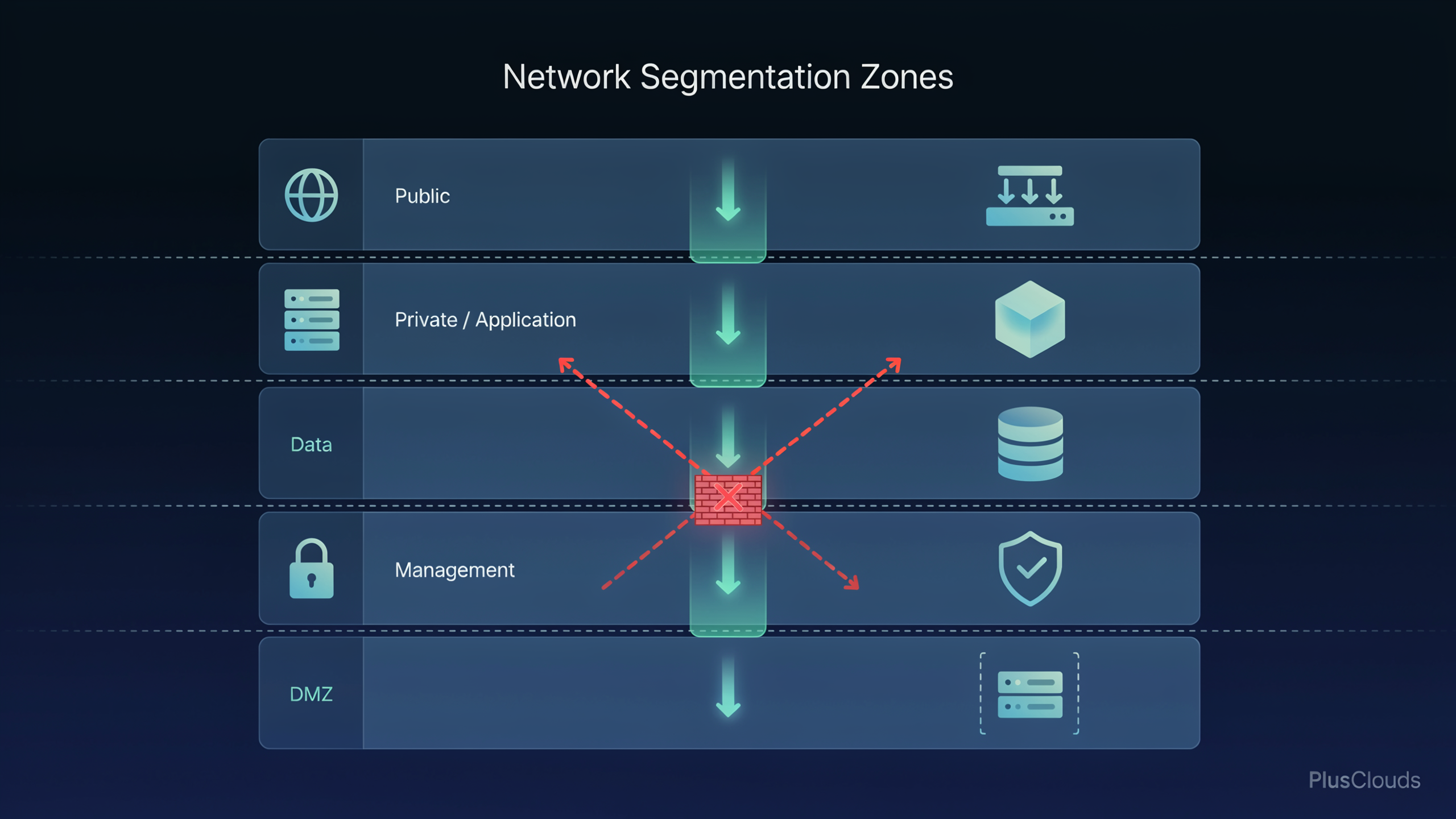
Segmentation is the control that determines whether a single mistake stays contained or becomes a full breach. If a compromised web server can reach your database directly, your database credentials live on the most exposed machine in your stack.
The standard pattern separates workloads into zones:
- Public zone: load balancers and anything that must accept internet traffic.
- Private/application zone: application servers, reachable only from the public zone on specific ports.
- Data zone: databases and storage, reachable only from the application zone.
- Management zone: bastion, monitoring, and admin tooling, reachable only via VPN.
- DMZ: any service that must be partially exposed, isolated so a compromise there can't traverse into the rest.
The failure mode is almost always drift toward flatness. Someone connects a private subnet to the internet "temporarily." A developer adds a route to make debugging easier. Six months later the diagram in the wiki describes a network that no longer exists.
If your environment has drifted (and most have), our guide to segmenting a cloud network into public, private, VPN, DMZ, and management zones walks through the rebuild step by step. The principle underneath it all is the same one NIST formalizes in its zero-trust guidance: no connection is trusted because of where it sits on the network. Every flow is verified, every time (NIST SP 800-207). Platforms like PlusClouds make this practical by offering all five network types plus load balancers from a single control plane, so segmentation is a configuration choice rather than a routing project.
How to Audit Your Cloud Infrastructure for Misconfigurations
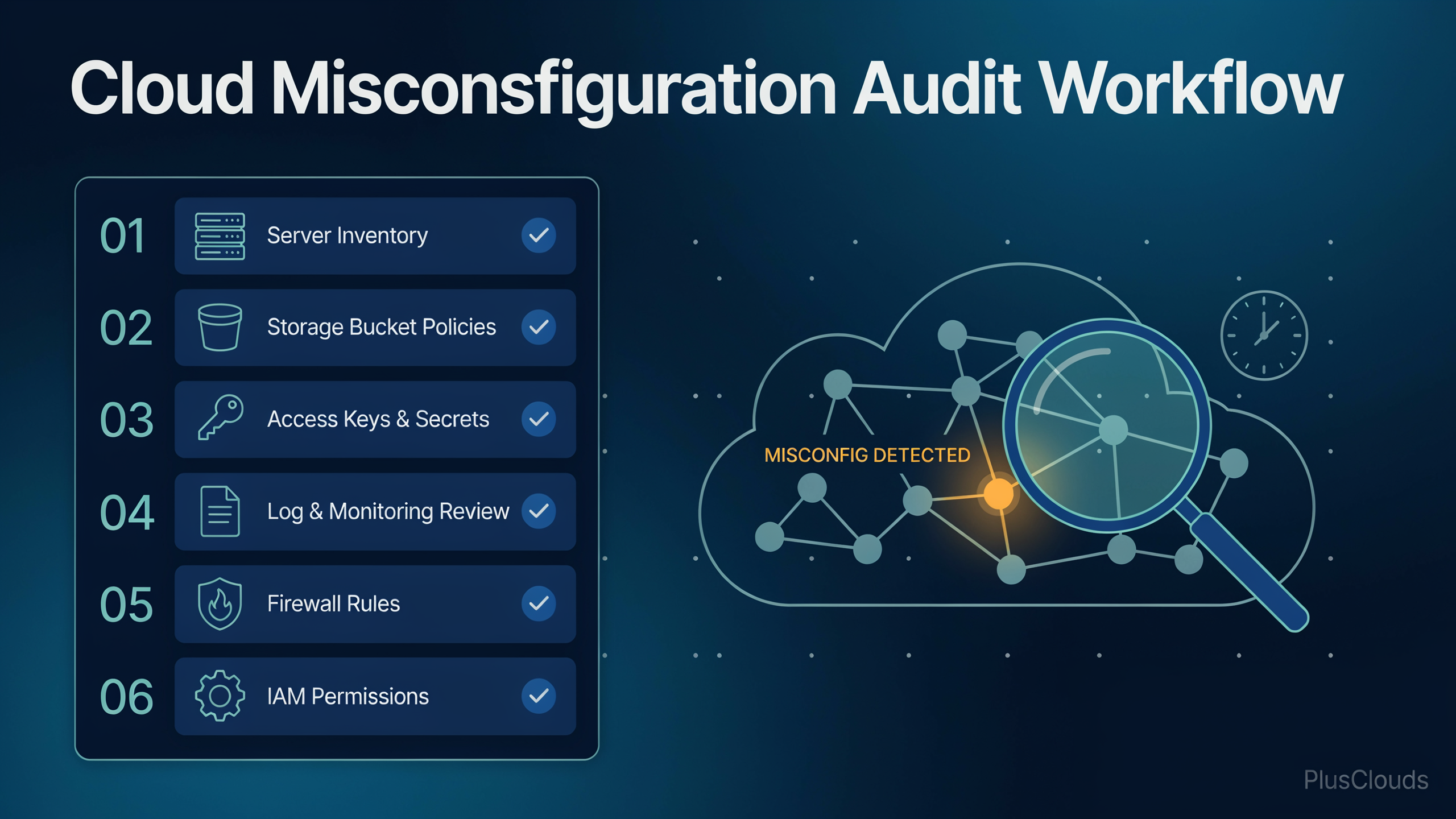
You cannot fix what you haven't enumerated. A structured cloud security audit beats ad-hoc panic every time.
Step 1: Inventory everything. Every VM, bucket, database, load balancer, identity, and network rule, across all accounts and regions. The forgotten resources are the dangerous ones.
Step 2: Check exposure. From an external vantage point, scan your IP ranges for open ports and exposed services. Anything reachable that shouldn't be is finding number one.
Step 3: Review firewall and security group rules. Flag every rule with 0.0.0.0/0 or an unexplained source. Every rule should map to a documented requirement.
Step 4: Audit IAM. Look for wildcard permissions, unused access keys older than 90 days, and identities with admin rights that don't need them.
Step 5: Verify logging. Audit logs, access logs, and flow logs should be enabled everywhere and shipped somewhere immutable.
Step 6: Test the WAF. Send known-bad payloads at your own endpoints and see what gets through.
Step 7: Re-run on a schedule. A one-time audit has a shelf life of about a month. Automation that continuously compares actual configuration against your intended baseline is what keeps the gap closed. Tools in the zero-trust and CSPM space formalize this; our guide to zero-trust hardening on a budget covers how to prioritize controls when budget is finite.
Building a Hardened Default: Stateful Firewalls, WAF, and DDoS Protection Working Together
Individual controls are good. Layered controls that cover each other's gaps are what actually holds up in production.
- The stateful firewall controls who can reach what, at the network and port level.
- The WAF inspects what that traffic contains, catching application-layer attacks the firewall can't see.
- DDoS mitigation keeps both of them available when someone decides to exhaust your bandwidth or connection tables instead of breaching them. Volumetric attacks don't care how well your rules are written if your infrastructure is offline.
The key insight is that these layers fail differently. A DDoS flood can take an untuned WAF offline. A WAF bypass doesn't help an attacker if the firewall never let the connection through. Designing them as a system, with consistent rules and a single view of traffic, is what turns three products into a defense. If you're evaluating how these layers interact under real attack conditions, our breakdown of defending against multi-vector DDoS across layers 3, 4, and 7 covers the mechanics in depth.
Hardened defaults matter as much as the tooling. New environments should come into existence already segmented, already behind the firewall and WAF, already logged. Retrofitting security onto an environment that grew up exposed is far more expensive than starting from a secure baseline, which is one reason we built PlusClouds Cloud Servers to deploy in 60 seconds with the security stack available from day one rather than as a later project.
Compliance Implications: ISO 27001, SOC 2, and GDPR Requirements You Can't Ignore
For many organizations, the audit that matters isn't the attacker's port scan. It's the assessor's checklist.
ISO 27001 requires documented control over access to information assets. A firewall rule nobody can explain is an audit finding. A documented, reviewed rule base is evidence.
SOC 2 examiners test whether your controls operate consistently over time. Continuous configuration monitoring with alerts on drift is exactly the kind of evidence that satisfies a trust services criterion.
GDPR treats preventable exposure of personal data harshly. A publicly accessible bucket containing EU personal data is a reportable breach regardless of whether anyone downloaded anything, and regulators have repeatedly shown little patience for "we misconfigured it" as a defense.
The efficient path is to treat compliance as a byproduct of good configuration hygiene rather than a separate annual scramble. If you're weighing which framework to pursue first, our comparison of ISO 27001 versus SOC 2 for cloud businesses explains how to use your infrastructure configuration itself as audit evidence. For payment workloads, the overlap is even tighter: PCI DSS 4.0.1 explicitly requires firewall protection, WAF coverage, and network segmentation, which our PCI DSS compliance guide for cloud infrastructure maps control by control.
A Practical Misconfiguration Remediation Checklist
Here's the cloud misconfiguration remediation checklist, in priority order. Items at the top close the most dangerous gaps fastest.
- Remove all internet-facing management access. SSH and RDP behind a bastion or VPN only, effective today.
- Purge unexplained firewall rules. Every rule gets an owner, a purpose, and a review date, or gets deleted.
- Lock down storage and databases. No public access unless there's a written, approved justification.
- Segment the network. Public, private, data, and management zones with deny-by-default rules between them.
- Tune the WAF. Move from default rules to detection mode, review, tighten, enforce. Add positive security on critical endpoints.
- Enable and centralize logging. You need immutable logs before the incident, not after.
- Right-size IAM. Kill wildcard permissions, rotate keys, enforce short-lived credentials where possible.
- Establish continuous configuration monitoring. Alert on drift from your documented baseline.
- Test recovery. Configuration controls fail sometimes. Verify your backups actually restore, with explicit RPO and RTO targets.
- Schedule the next audit. Quarterly at minimum, or continuous if you have the tooling.
The Next Step
Cloud misconfiguration isn't a knowledge problem. Everything in this article is documented, well-known, and fixable with configuration changes rather than new headcount. It's an execution problem, and execution comes down to defaults, automation, and a platform that makes the secure path the easy path.
If you're evaluating infrastructure where hardened networking, a stateful firewall, WAF, and DDoS mitigation arrive as standard rather than as a project, take a look at PlusClouds Cloud Servers and the Cloud Security stack. Run your first misconfiguration audit this week, fix what you find, and set a recurring date for the next one. The window you close today is the breach that never happens.